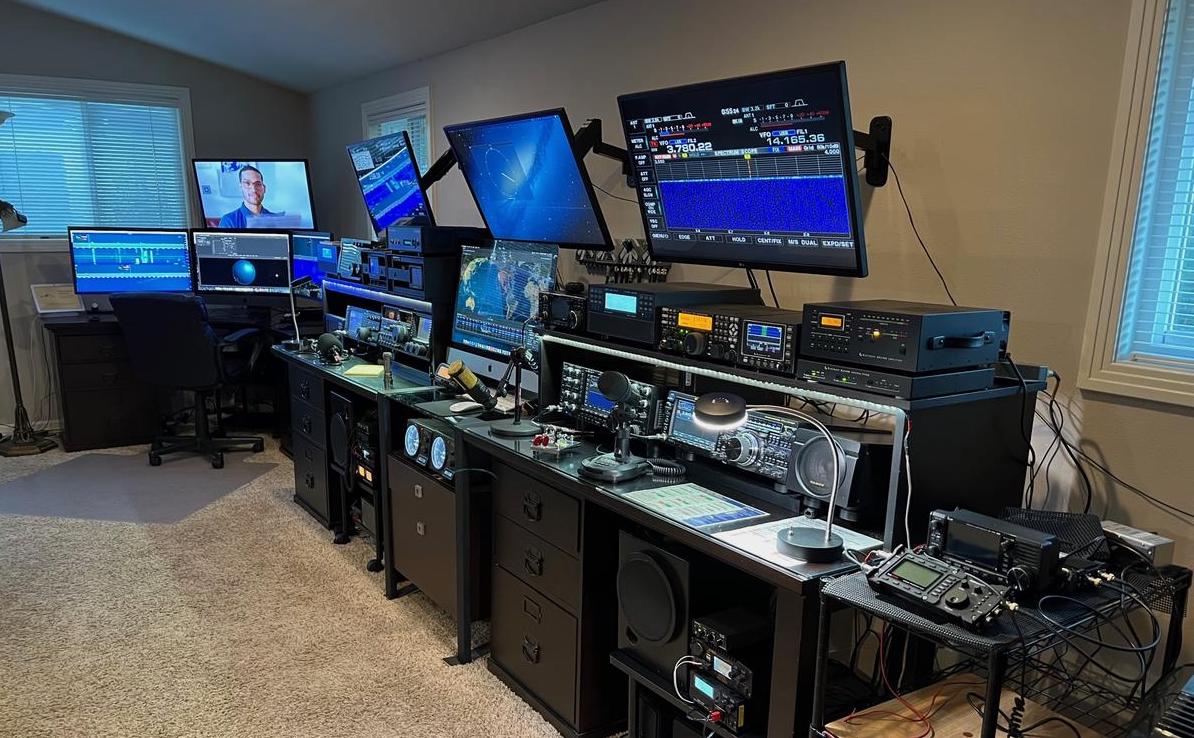
Congratulations on your new amateur radio license. Now it’s time to get on the air. Sure, you can use borrowed equipment to get on air, but what fun is that? Importing a transceiver with the proper approvals can be complicated. These are the exact steps you need to follow to import an amateur radio transceiver to Sri Lanka with a valid Sri Lankan amateur radio license.
The steps:
- Initial TRC approvals
- Ministry of Defence clearance
- TRC final approval
- Obtaining an import license from the Import Export Control Department
- Customs Clearance
- Certification and TRC registration
You may click on the links above to jump to the relevant section.
Let’s dive right in.
Initial TRC Approvals
As you know, the Telecommunications Regulatory commission is the regulatory body that has issued your amateur radio license. According to the law, any communications equipment requires authorization from the TRC to own and operate.
To obtain approval, you need to send an official request email to the TRC. With this email, you need to attach:
- A cover request letter stating your callsign, contact details, make/model of the transceiver, and a list of the following attached material.
- A technical specifications document of the transceiver you’re importing. (This can be a specifications sheet or a brochure)
- One or more proforma invoices from the suppliers you intend to purchase your transceiver from
(Important: Make sure the invoice(s) accurately describe the equipment you’re buying AND payment method)
OR
A Letter from the donor, if your equipment is donated (i.e., you are not purchasing it) - A copy of your license
Make sure the subject and body of the email are appropriate and send the email to [email protected]
You will receive a reply to that email within 2 business days with a reference number. You are supposed to provide the TRC with paper copies of everything you sent them. You may follow the instructions in the TRC email reply to do this. Please note that the TRC might contact you or reject your application if there are any errors.
Once the TRC’s internal processes are complete, the TRC will send an email to the Ministry of Defence stating that the TRC does not have any objections to you owning and operating the transceiver.
Ministry of Defence Clearance
The Ministry of Defence will conduct their internal processes and send you a form to be filled out for their recommendation. Please make sure that the HS Code for the transceivers you’re importing is 8517.62.10.
Once they receive the form, they will send the TRC a letter stating that they have no objections. You will be copied on this email as well.
TRC final approvals
Now all that remains is for the TRC to send an email to the Import/Export controller general stating that the TRC and the MoD have given approvals for you to import the transceiver. You will be copied on this email as well. Please make sure that this email clearly states the invoice number of the proforma invoices you have submitted (IF it is not a donation).
Obtaining an import license from the Import Export Control Department
Go to https://eservices.imexport.gov.lk and create an account. You may do this while you’re waiting for approvals from TRC and MoD as it might take a few days for your account to be approved. A guide on creating the account can be found here.
After you have all the other approvals, and your Import Export eServices account is approved, you can create an import license application as follows:
- Login at the eServices portal. You will see the dashboard once you log in.
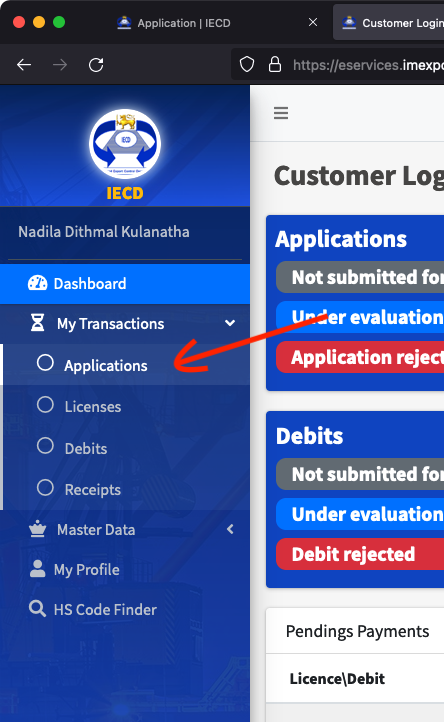
- Click on “My Transactions” on the left, and then click “Applications”
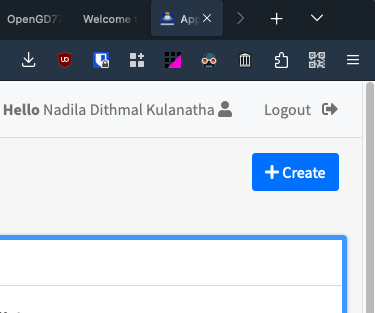
- You will see the applications view. There should be a button on the top right that says “Create +”. Click it.
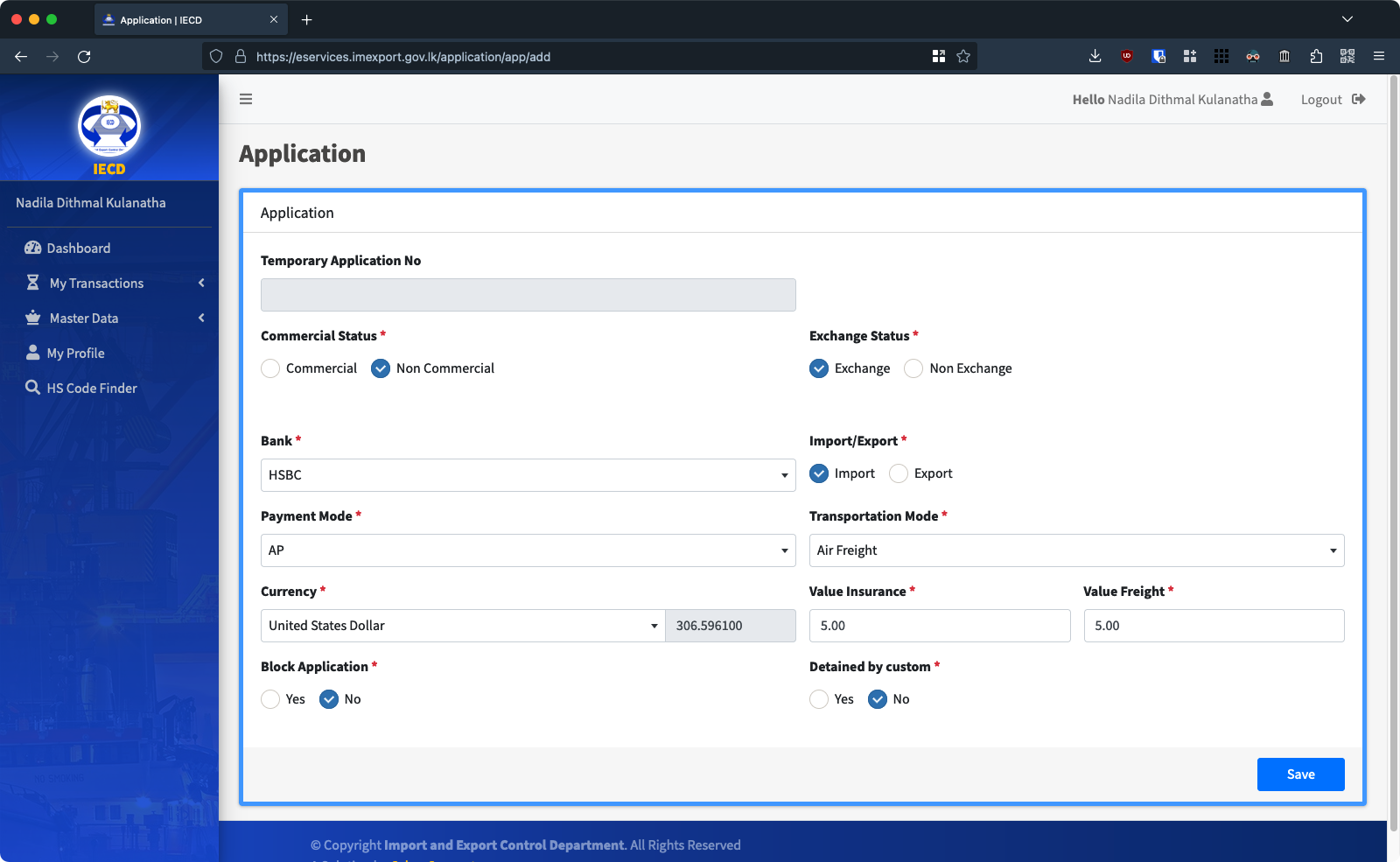
- Fill out the application as follows and click “Save”
A few things to remember: - In the next section. Click on the + sign next to the supplier name and add your supplier’s details.
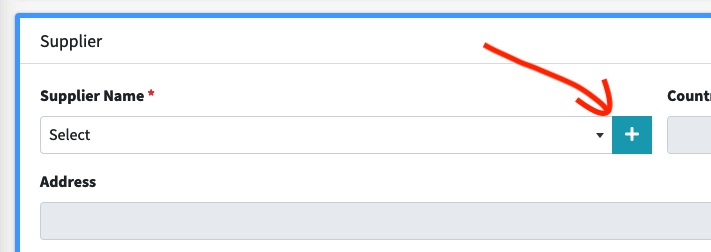
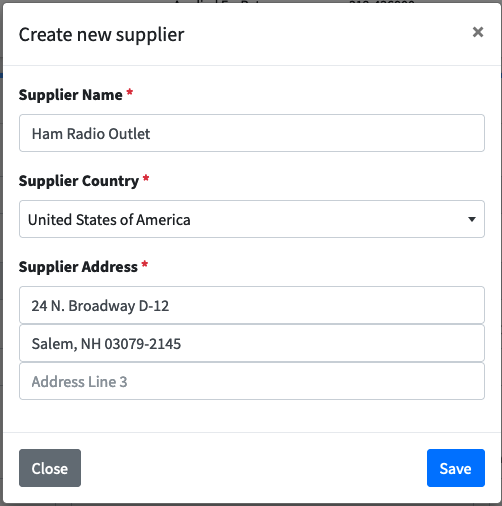
If your transceiver is a donation, you will see this screen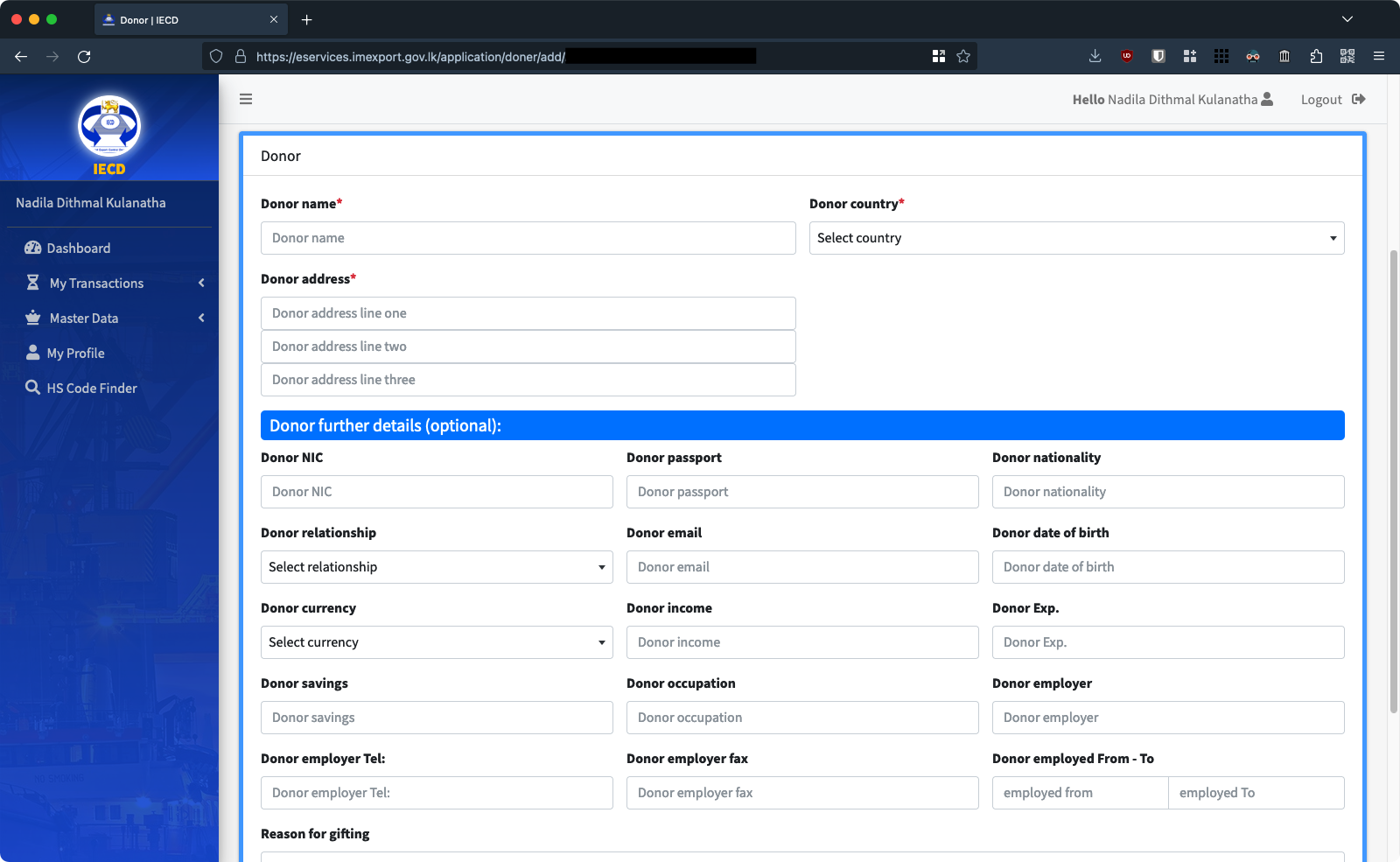
Fill in the details of the donor appropriately and click “Add Donor” - Fill in the rest of the Supplier/Donor section appropriately
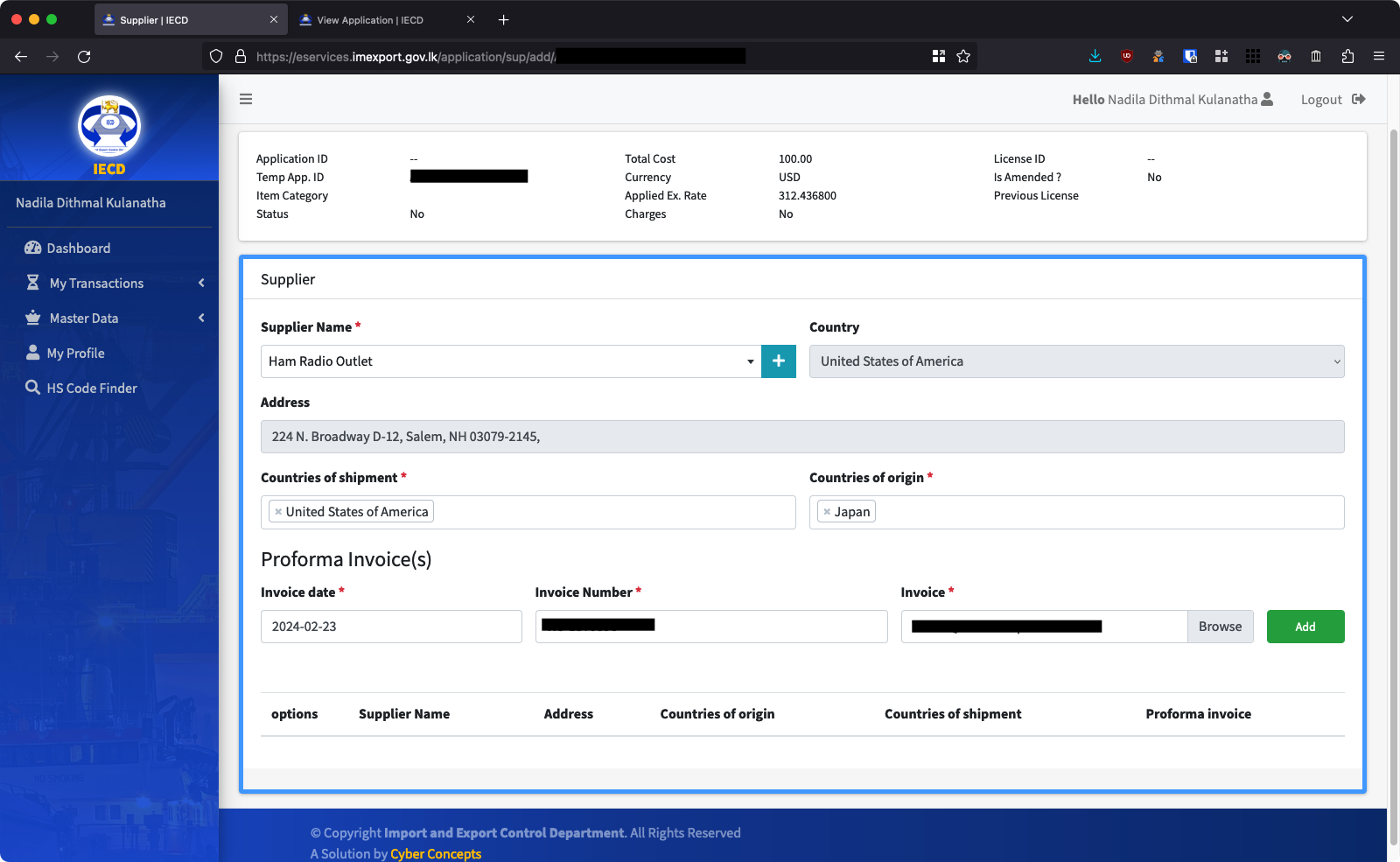
Fill in Country of Shipment (where the radio is shipped out of), the Country of Origin (where the radio was made). Then attach your proforma invoice (Make sure your proforma invoice mentions the relevant payment methods). Fill in the invoice number and add the invoice date. Finally, click “Add”. - In the Items Section, Select your supplier and fill out the details as follows:
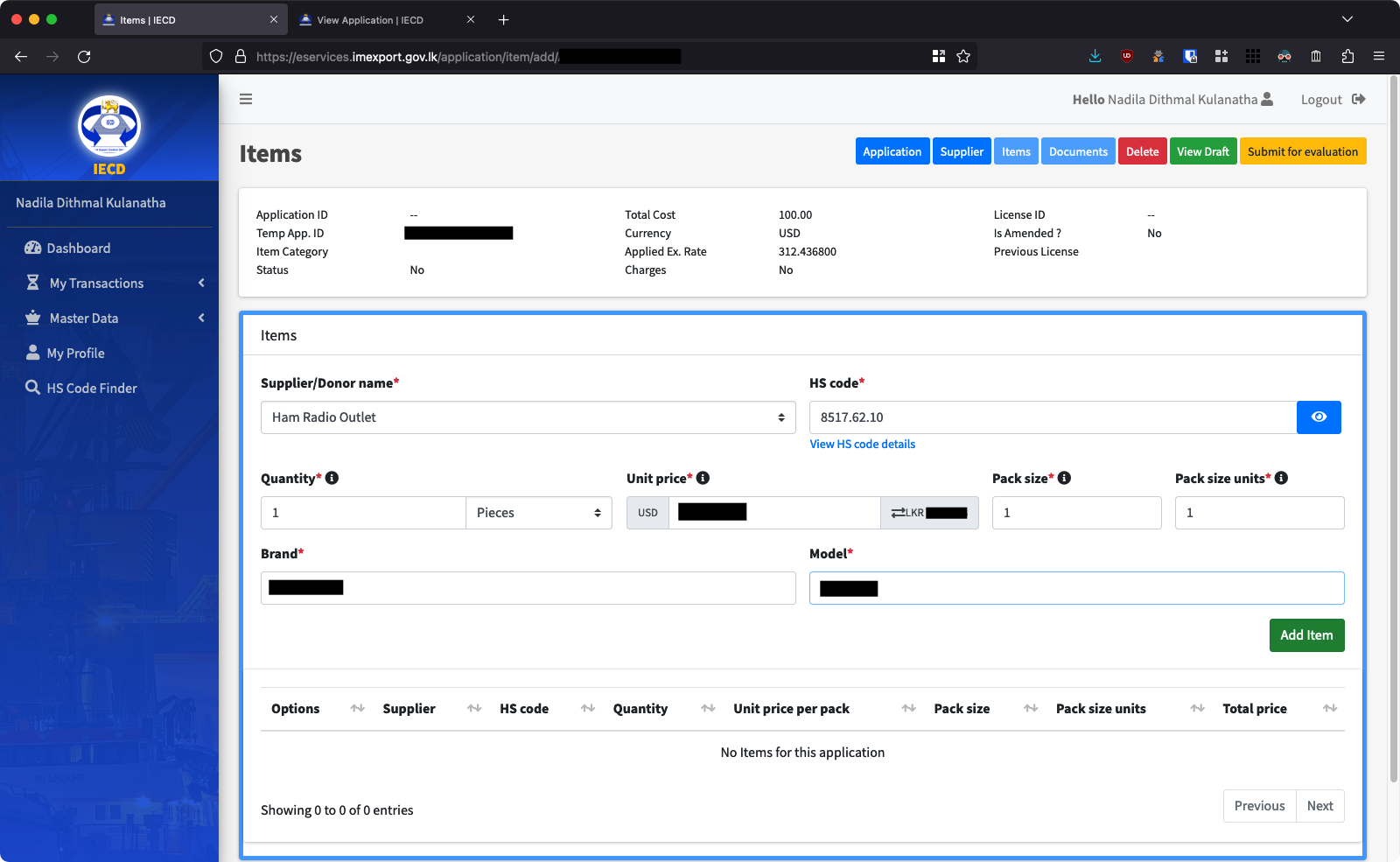
- If your transceiver is a donation, set Exchange Status to “Non Exchange” and to “Donor” like this:
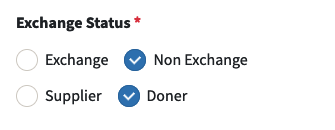
- If you are purchasing your transceiver, ignore the above and use the following instructions:
- Make sure to correctly select your bank and set payment mode to “AP” (Advanced Payment)
- You can obtain insurance and freight values (shipping costs) from the seller.
- IECD might require you to change Commercial status, Exchange status, and Payment Modes.
A few things to be careful of:
- Make sure the HS code is 8517.62.10 (Transmission apparatus with or without reception apparatus)
- Make sure the quantity is indicated in Pieces
Click “Add Item,” and then click the “Documents” button on top.
- In the Documents section, do the following
- Attach the final email you got from the TRC in the section where it says “Recommending Authority Letter or No Objection Letter” and click “Never Expires”. Click “Save” and wait for the document to upload and the page to reload.
- In the “Special Documents” section, attach the final letter you got from the Ministry of Defence, and in the Description type “Ministry of Defence No Objections Letter”. Again click “Never Expires” and click Save.
- If your transceiver is a donation, you may attach the donor letter here as well.
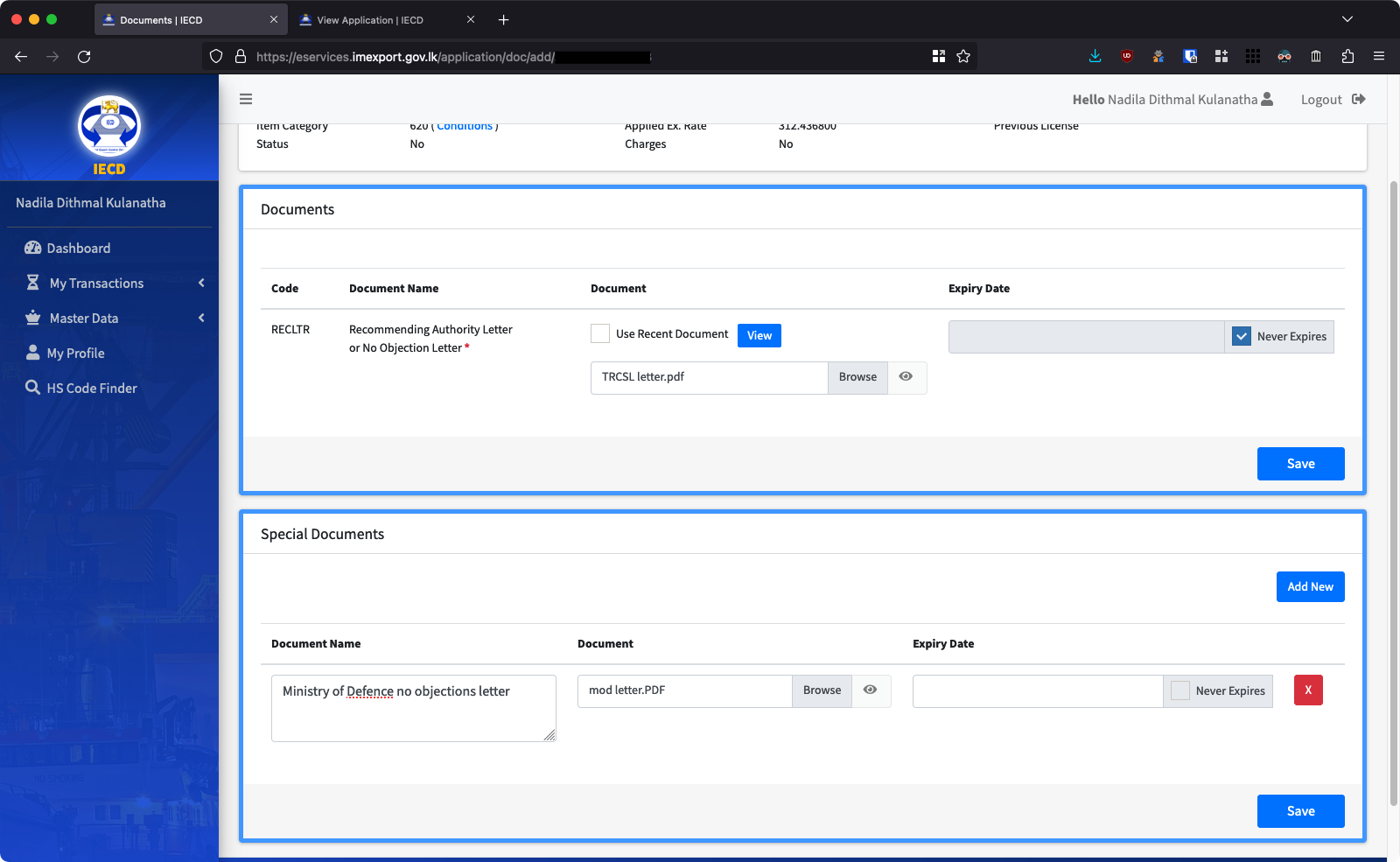
After all documents are uploaded, click “View Draft”.
- Check if everything is right in the draft screen:
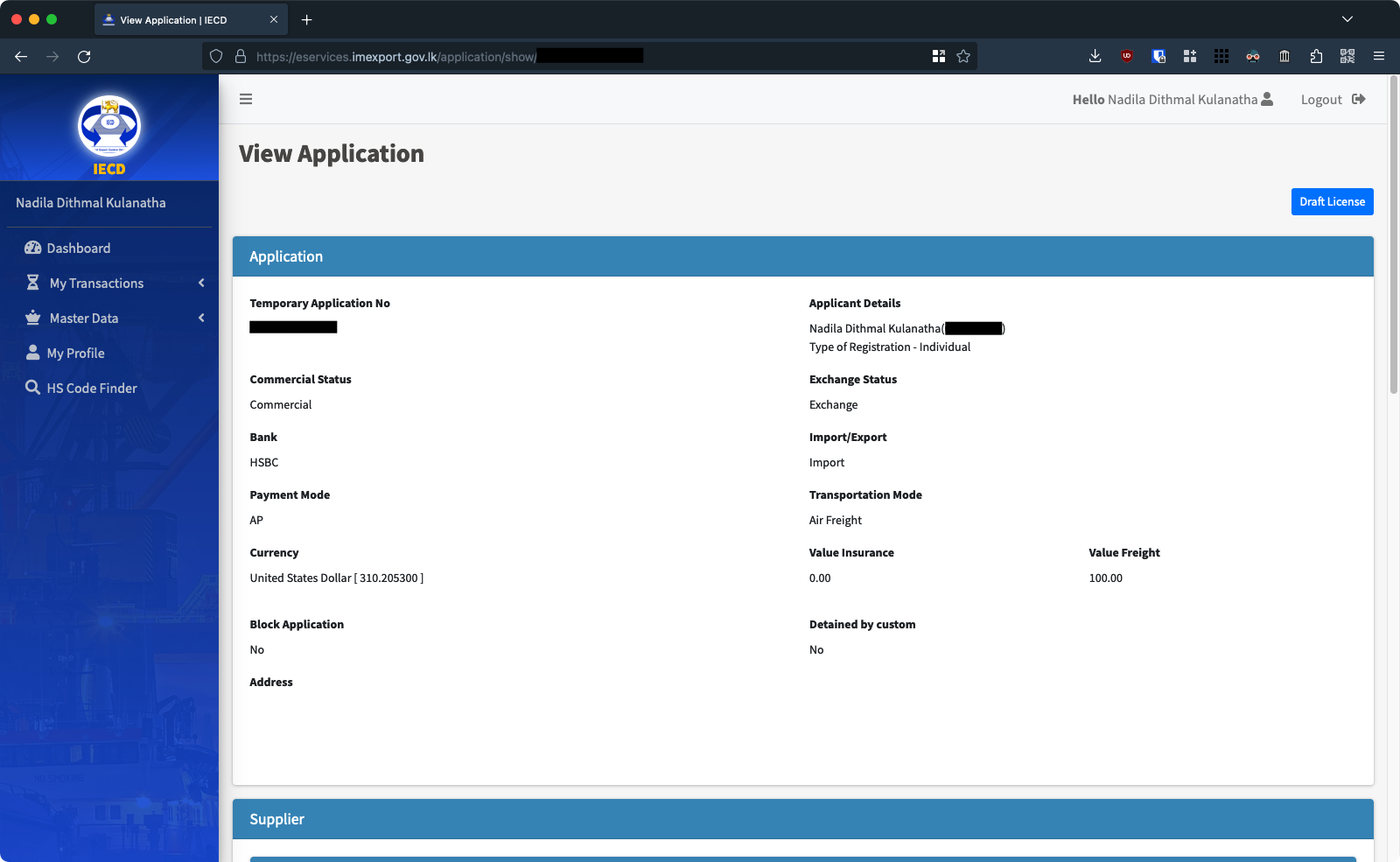
If it is, click the “Submit for Evaluation” button on top. - Review everything in the Submit for Evaluation section
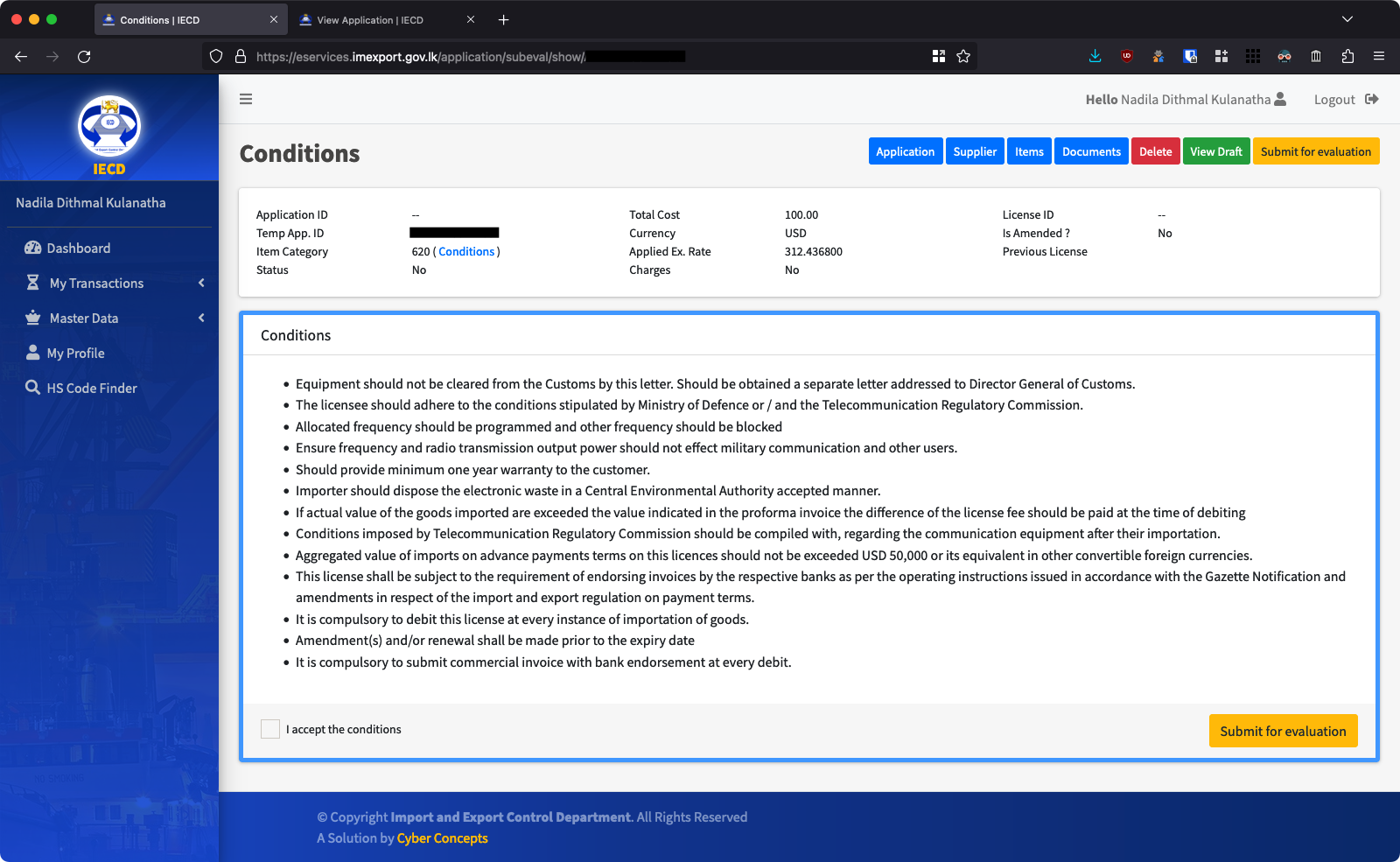
Click “I accept the conditions” and click the “Submit for Evaluation” button on the bottom. - In the Applications screen, you will see your new application as “Submitted for Evaluation”
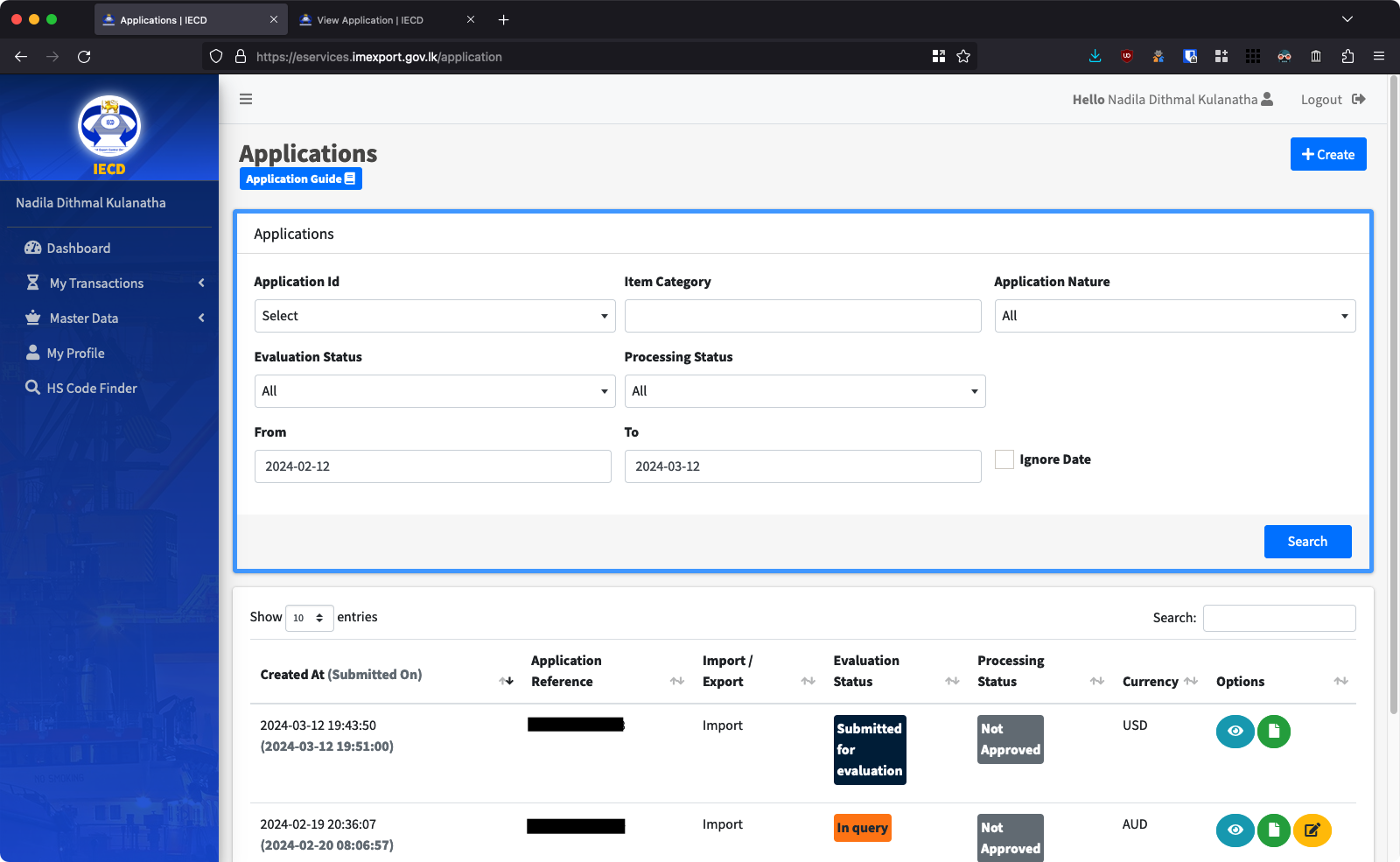
- If you see your application’s status marked as “In query”, it means there is an error in your application. You can go in and edit the application. IECD staff will have marked any errors in your application.
- Finally, when your status becomes “Application Accepted for Processing” you should see a pending payment in your Dashboard screen here:

- You may make the payment online as per the guide here (http://imexport.gov.lk/index.php/en/downloads/guidelines-for-online-payments.html) or in person at the Import Export Control Department.
- Finally, you can collect your Import License at the Import Export Control Department premises in Colombo.
Importing and Customs Clearance
Now, you can import your transceiver. After the transceiver has arrived, you will need to provide the import license and other documents (originals and paper copies) to your courier service. If you imported your transceiver through post, you will be required to present the documents (originals and paper copies) while clearing your equipment through the Central Mail Exchange (https://maps.app.goo.gl/nbgZs1UiUgWRzrRc6). You will be required to pay any clearance charges, taxes, and customs duties as notified to you by the courier service or postal staff.
Certification and TRC Registration
Call the TRC (Phone Number: 1900) and make an appointment for you to go in and register your equipment. Make sure to bring your license booklet, and a copy of the TRC final approval letter. It is a fairly quick and simple process to register your transceiver with the TRC.
You may finally use your shiny new radio to get on the air. Congratulations!
Importing a transceiver may be a complicated process. If you need any help figuring out the process, feel free to reach us at [email protected] or on Facebook.
An older version of this guide can be found at: https://old.rssl.lk/2023/09/27/importing/
Image credits: WA6DKN


Leave a Reply to Hewa battle Isuru Udana Cancel reply